


Best fit
Teams with a permissioned audience, a maintained segmentation model and an operational process for replies, failures and opt-outs.
Choose a connected channel, select all eligible contacts, a segment, an imported list or a retargeted audience, personalise supported content, and monitor the status signals the provider returns.
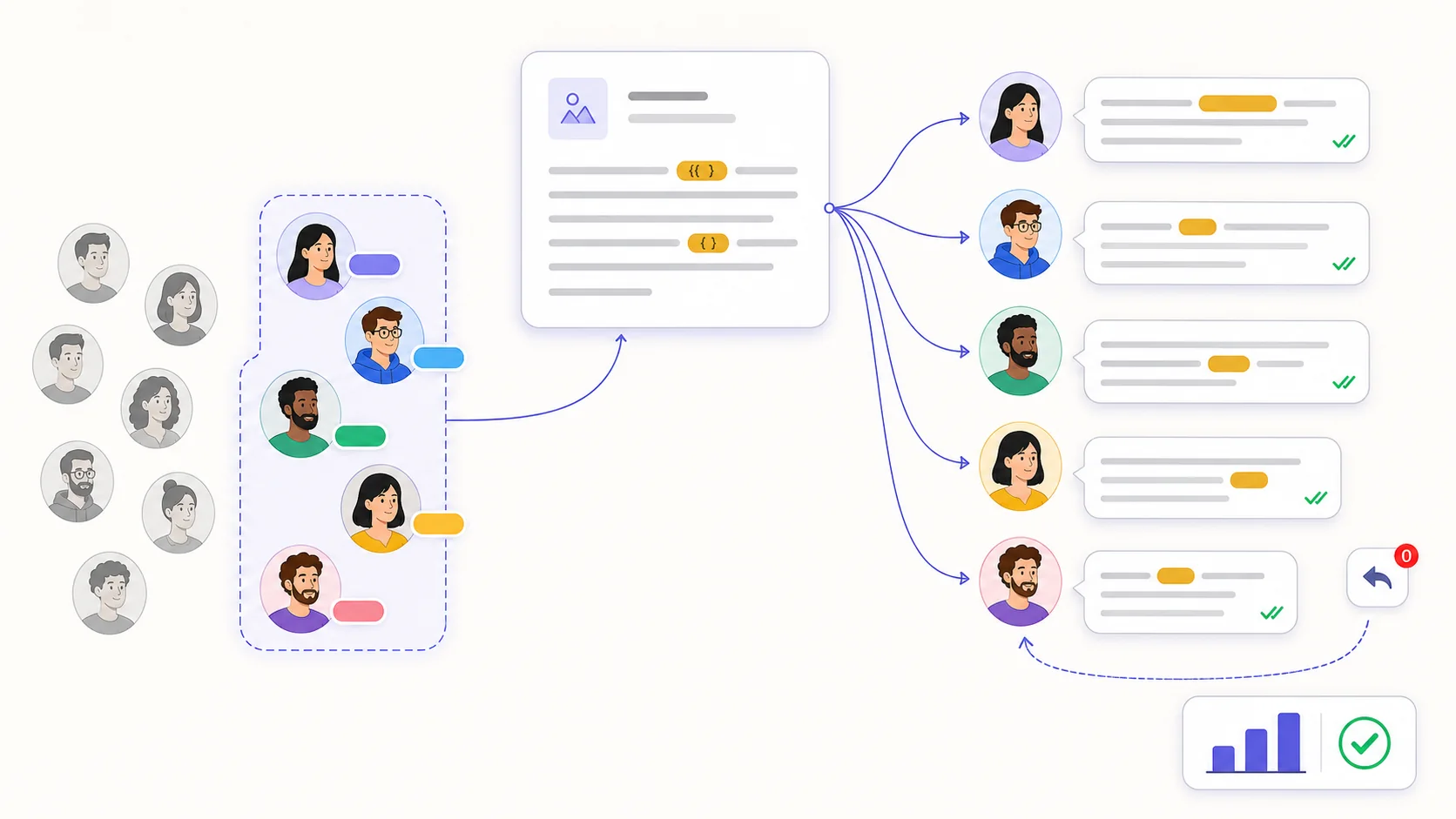
Send to all non-blocked contacts, a saved live segment, an imported phone list or recipients selected from a previous campaign's recorded behavior. Preview the current count and verify the list before sending.
WhatsApp campaigns require an approved template for the selected channel. Other supported channels use the campaign content builder; variables resolve from contact data and may be blank when the source field is empty.
Each recipient progresses through queued, sent, delivered, read, replied or failed when Labeeq receives the relevant events. Customer replies within the attribution window stay in their channel conversation.
Choose the channel and audience source, then review the live count or imported-recipient rows and exclude anyone without valid permission.
Select an approved WhatsApp template or build supported content for another channel; inspect every variable and send a test to a chosen contact.
Send now or schedule the draft, keeping the plan allowance and the provider's messaging tier, policy, pricing and rate limits in mind.
Review sent, delivered, read, replied and failed records where available; retry deliberately or use a configured SMS fallback for eligible WhatsApp failures.
Teams with a permissioned audience, a maintained segmentation model and an operational process for replies, failures and opt-outs.
A WhatsApp campaign requires an approved template associated with the selected channel or available company-wide. Sending remains subject to Meta policy, recipient permission, template status, messaging tier, service availability and provider charges.
Choose all eligible contacts, a label or saved segment, an imported phone list, or a retargeted set from a previous campaign. The preview is a current estimate; live segment membership is evaluated at send time and imported rows are snapshotted.
Yes. A drip campaign builds a published campaign-triggered flow with timed follow-up messages and optional stop-on-reply behavior. Each recipient still depends on broadcast and automation allowances, provider delivery and flow collision guards.
Each capability supports a different part of the customer workflow.
 An AI teammate
Answers from maintained knowledge in a configured language, runs enabled actions, and hands the conversation to a human under your rules.
An AI teammate
Answers from maintained knowledge in a configured language, runs enabled actions, and hands the conversation to a human under your rules.
 Sell and fulfil in chat
Keep a catalogue with stock, let an AI agent or your team take the order in the conversation, then move it from new to delivered and message the customer at each step.
Sell and fulfil in chat
Keep a catalogue with stock, let an AI agent or your team take the order in the conversation, then move it from new to delivered and message the customer at each step.
 CRM & pipeline
Keep contact history beside separate deals, values, outcomes and the lifecycle stages your team defines.
CRM & pipeline
Keep contact history beside separate deals, values, outcomes and the lifecycle stages your team defines.
 Flows & automation
Use visual triggers, conditions and actions to route, qualify, reply and escalate without writing code.
Flows & automation
Use visual triggers, conditions and actions to route, qualify, reply and escalate without writing code.
 Insight, not guesswork
Review conversation volume, response and resolution times, team workload and the report filters available to your plan.
Insight, not guesswork
Review conversation volume, response and resolution times, team workload and the report filters available to your plan.
 Lead capture and follow-up
Keep enquiries from connected channels with the contact record, then use configured AI, routing, deals and tasks to manage the next step.
Lead capture and follow-up
Keep enquiries from connected channels with the contact record, then use configured AI, routing, deals and tasks to manage the next step.
 Organised for busy periods
Use ownership, team routing, statuses and workload reporting to keep peak-hour conversations visible and accountable.
Organised for busy periods
Use ownership, team routing, statuses and workload reporting to keep peak-hour conversations visible and accountable.
 Sign-in and access controls
Use encrypted connections, optional two-factor sign-in and passkeys, roles, phone masking and private-file checks as part of your security process.
Sign-in and access controls
Use encrypted connections, optional two-factor sign-in and passkeys, roles, phone masking and private-file checks as part of your security process.

Start your free 14-day trial today — no credit card required.