


Getting started
Set up your workspace in one click with starter packs
Pick the pack for your kind of business and get ready flows, AI agents and quick replies.
Watch how to set up your workspace, answer customers, build automations and sell more, one short video at a time.
Pick the pack for your kind of business and get ready flows, AI agents and quick replies.

Add your logo, contact details, time zone, language, currency, brand identity and business hours.

Photo, language, time zone, alerts, password, two-factor sign-in, passkeys and social sign-in.

Invite teammates by email, choose what each role can see and do, and manage pending invites.

Chats from every channel in one list, with views, filters, open and closed tabs and the chat screen.

Add the customer's name with a variable, send emojis and files, and use quick replies with a slash.

Save common answers, add the customer's name, and send them from any chat with a slash shortcut.

Write notes the customer never sees and @mention a teammate to bring them into the chat.

Assign a chat to a teammate or AI agent, set its priority, snooze it, then resolve it with a reason.

Let AI Assist draft a reply, fix it, change its tone, translate it and summarize the chat.

Reach the customer again with an approved template once the 24-hour window has closed.
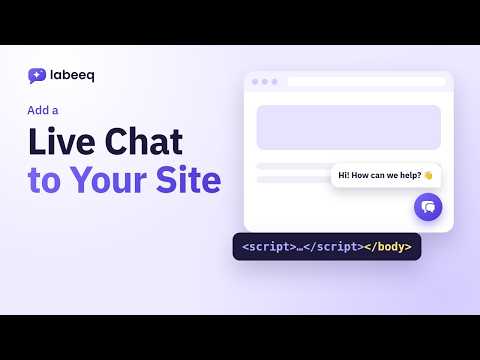
Set the colour, photo and greeting, paste the snippet on your site, and answer from the inbox.

Update the About line, description, address, email, websites and category straight from Labeeq.

Write the name, language, category, variables and body, then submit it and follow its status.

Add a webhook with its events, create an API token with the right permissions, and connect Zapier or n8n.

Start from a template, choose its language, adjust the instructions and decide what it may do.

Add documents and web pages, share sources between agents, and write example replies in your tone.

Review what it learned from finished chats, approve or reject it, and tidy your instructions.

Try it in the playground, save scenario checks, and make it the default agent for new chats.

Enter the name, phone with country code, email and labels, then open the full profile.

Upload the file, match the columns, review, and label everyone in the file to find them later.

Label many contacts at once, save filters as segments for campaigns, and add your own fields.

See a customer's stage, details, deals, orders and chats on one page, with notes and follow-up tasks.

Add a company, link the people you deal with, and follow its deals, notes and messages in one timeline.

Map the journey from new lead to paying customer and score each signal to see who is ready to buy.

Track every inquiry's status and owner, mark it contacted, and turn it into a deal when they are ready.

Add the value and customer, set a follow-up task, then mark it won or lost with a reason.

See every stage's deals and value, drag deals forward, filter by teammate and preview any deal.

Order your stages, set each win probability and when a deal is stuck, and list why you win and lose.

Group teammates and AI agents, then send new leads to the right people in turn or to the least busy.

Share your booking link, set the meeting title, length and notice, and see bookings in your calendar.

Pick a period and see chats, response times, resolutions, ratings, deals and revenue by teammate.

Pick the channel, then send to all contacts, a saved segment or an imported list and see the reach.

Build the message from blocks with the first name, buttons, files, WhatsApp templates and follow-ups.

Send yourself a test, pick a gentle speed to protect your number, then schedule or send and follow it.

Get a draft in seconds, keep everything in the library, and see the month on the calendar.

Browse the library, preview a template, build it, then check the trigger and steps before publishing.

Give each button its own path, wait for a reply, create deals, add labels and assign the chat.

Test on a contact without sending anything, publish, keep every version and see where customers stop.

Add a product with its price and picture, track stock, and add variants like sizes with their own price.

Add an order with products, address and payment method, then move it from new to delivered.

Add payment methods, turn on a message for each order step, and set receipt numbers and tax.
The help center has written step-by-step guides for every part of Labeeq.
Open the help centerStart free and follow along with the videos as you set up.